A granular instrument for iPhone and iPad
Record anything. Turn it into sound.
Grainfold turns a voice memo, a kettle or a city street into loops, drones, melodies and shimmering clouds of grains. Lock it all to the beat, let each grain pick its own note in any key, and watch the waveform show what every knob does. Then play the waveform itself with your fingers or MIDI.
Free to download and try. The full version is $19.99, one time, and yours for life. No subscriptions, ever.
- Four regions, A to D
- Grains that play melodies in any key
- Every knob shows what it does
- AUv3 for GarageBand and other hosts
- Everything stays on your device
- Free to try · $19.99 once, for life
What it is
A sound, folded into an instrument
Granular synthesis cuts a sound into tiny grains, a few milliseconds each, and plays them back in clouds: stretched, scattered, layered and pitched. It can turn a single breath into a choir, or a door slam into a storm.
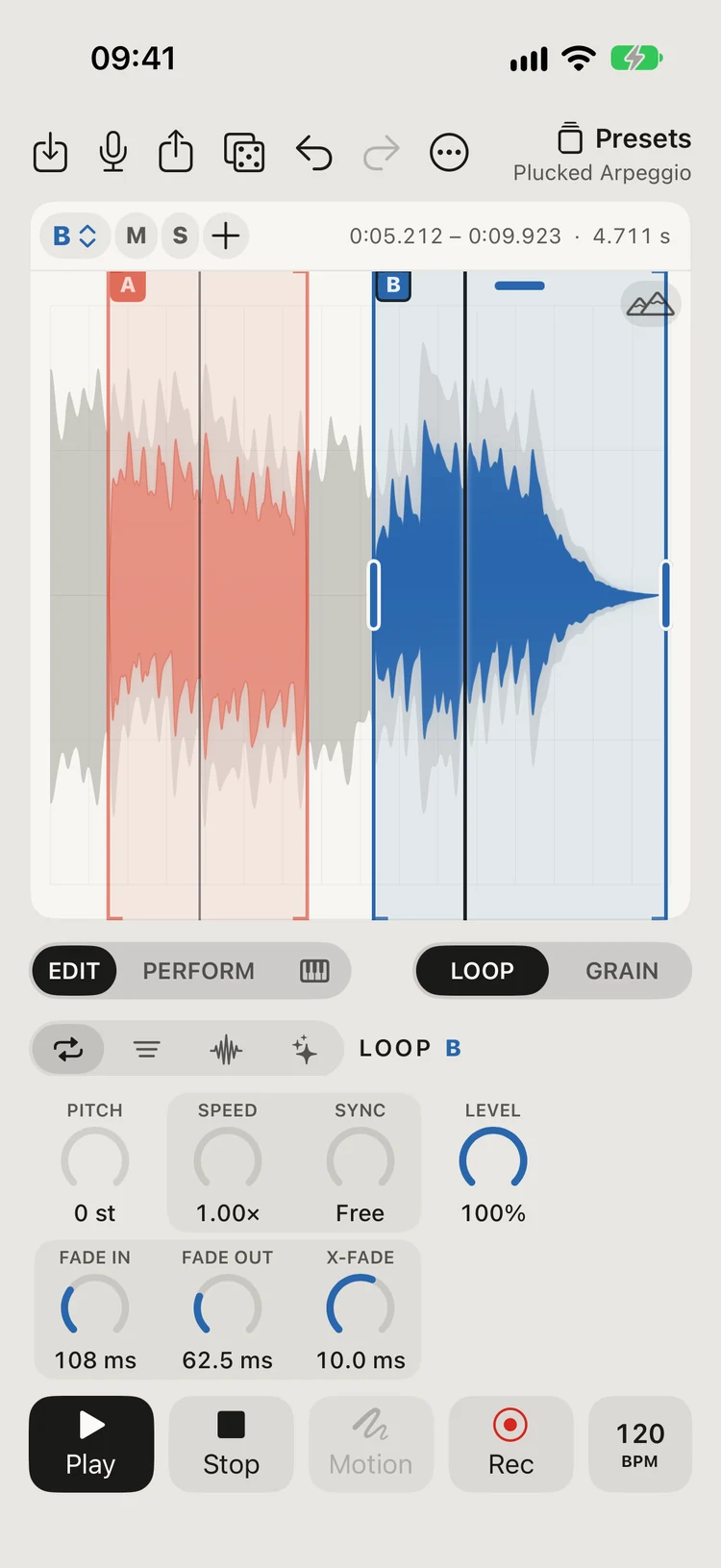
Grainfold puts that under your fingers. Record or import a sound, mark up to four regions on its waveform, and play each one as a seamless loop or as a cloud of grains. Then switch to PERFORM, and the waveform itself becomes the instrument.
- 4 regions
- A to D, each with its own mode and sound
- 5 ms – 2 s
- Grain length, from a click to a phrase
- 100 / s
- Grains per second in each region
- ±24 st
- Pitch, two octaves either way
- 48 kHz
- WAV export, 16 or 24-bit
How you can use it
From a voice memo to a live set
- Field recordings
Endless pads from a single second
Rain on a window, a passing train, the hum of a fridge. Fold a second of it into a pad that never runs out.
- Voice
Your voice, as an instrument
Hum one note and turn it into a choir, a drone or a stutter that follows your fingers.
- Sound design
Textures for film and games
Build ambiences, risers and impacts, then export WAV files ready for your editor or game engine.
- Performance
An instrument you play live
In PERFORM, the waveform is the instrument: across a region sets one control, up the waveform another.
- Sketching
Ideas, wherever you are
Record, loop, save it as a project. Pick it up later exactly where you left it.
How it works
Five steps from any sound to your own
Record or import
Record with the microphone, or import any audio file from Files.
Mark regions
Drag across the waveform to mark up to four regions, A to D.
Loop or grain
Each region loops seamlessly or plays as a cloud of grains you shape.
Play it
Switch to PERFORM and play the waveform with your fingers. Record a gesture and it loops.
Keep it
Save the sound as a preset, the work as a project, or export a WAV.
Features
Everything it does
Deep enough for sound design, simple enough to pick up and play.
Four independent regions
Mark up to four parts of a sound, A to D. Each has its own mode, pitch, envelopes, filter and modulation, with mute and solo.
Grains with character
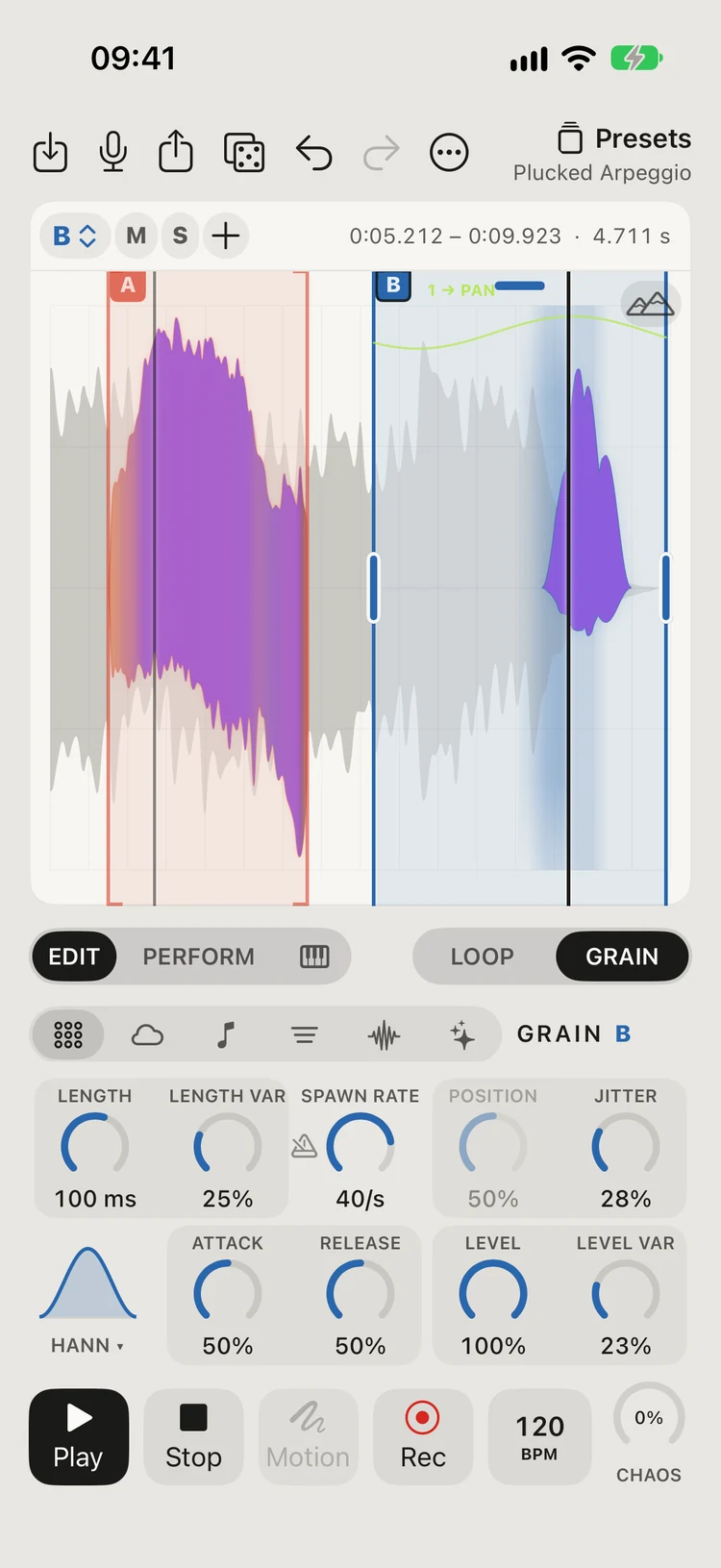
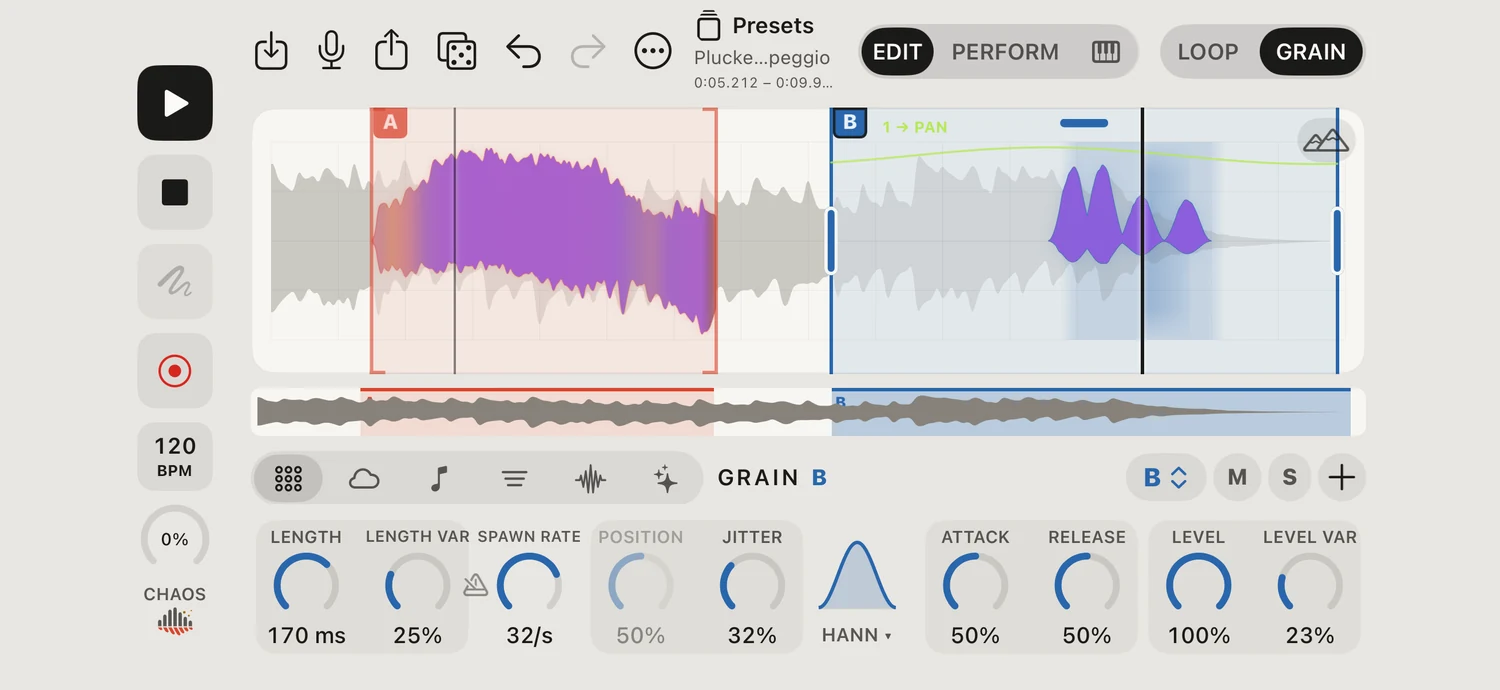
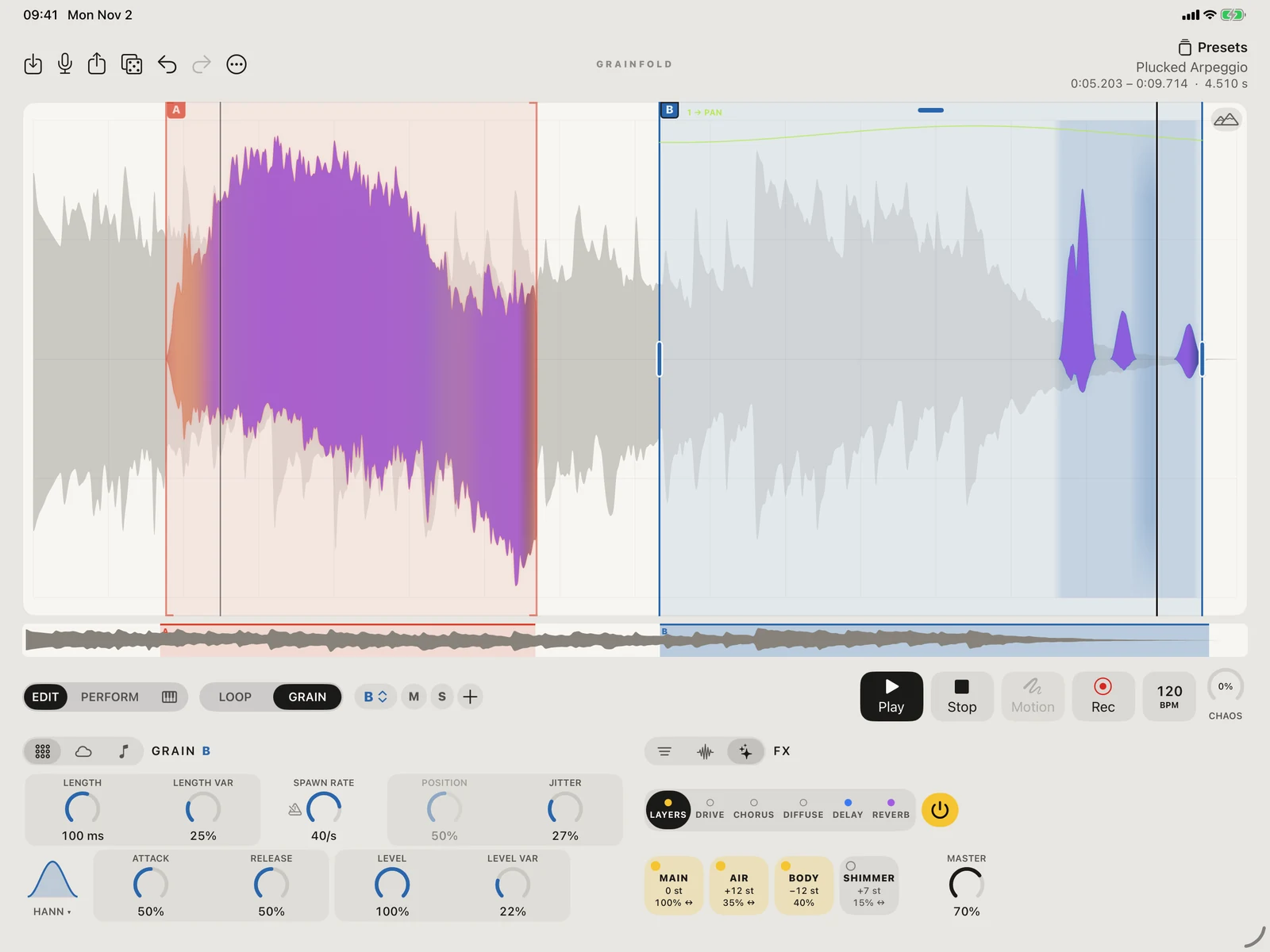
Set each grain’s length, how often grains spawn, where they come from and how far they scatter. Vary their length and level, reverse some, spread them from centred to wide. Eight grain shapes, from smooth Hann to plucked Decay.
Tempo that fits your track
Type or tap a BPM. Spawn grains on the beat, fit any loop to exactly one, two or four bars, and sync scanning, LFOs and delay. A metronome with seven sounds keeps time from 2/4 to 12/8. In AUv3, follow your host’s tempo.
Melodies from grains
Let every grain pick its note: random notes of a scale, a line that wanders by steps, a melody that settles on the key, or a short motif that slowly evolves. Major, minor, pentatonic, fifths, octaves or your own intervals, in any key.
Scanning and LFOs
Move through the sample with loop, ping-pong or one-shot scanning. Animate sound parameters with two LFOs per region, free or tempo-synced, with retrigger options.
Envelopes and filters
Shape notes and filter movement with ADSR envelopes. Choose low-pass, band-pass or high-pass filtering and control how the filter responds.
Seamless loops, flexible pitch
Fade and crossfade your loops. PITCH changes pitch while keeping the timing; SPEED changes the tempo while keeping the pitch, and SYNC fits a loop to the bar.
A waveform that responds
The sound is always there, and lights up where grains are playing. The scan line sweeps, each LFO draws its wave and names what it moves, and the processed preview is coloured by what each effect adds.
Every knob shows what it does
Turn a knob and the waveform shows it, clear of your finger: a grain’s length, how often grains come and from where, the notes they’ll play next, the filter’s curve, the echoes and the reverb’s tail.
A live 3D spectrogram
One tap swaps the waveform for a spectrogram of what’s playing right now: frequency across, the last seconds receding, level rising from deep blue to red. Dock it small in a corner to keep both in view, and turn, move or zoom it with your fingers.
Layers and five effects
LAYERS adds octaves and fifths above and below, each tuned, levelled and placed from centred to wide. Then drive, a chorus of up to six voices, DIFFUSE to melt grains together, delay and reverb.
Touch and motion
Play regions with multiple fingers, assign X and Y to sound controls, and use LATCH to hold sounds. MOTION records and loops your gestures.
Keyboard and MIDI
Play up to twelve notes with velocity, sustain and pitch bend. Use the on-screen keyboard or a MIDI controller, and map knobs with MIDI Learn.
AUv3 instrument and Capture
Play inside GarageBand, Logic Pro for iPad, AUM, Cubasis and other Audio Unit hosts. Grainfold Capture records a free take or 1, 2 or 4 host-synced bars from a track into your library.
Record your performance
Record everything you play, effects included, as a 32-bit float WAV. Export to your DAW’s chosen folder in Files or iCloud Drive.
40 presets and complete projects
Explore forty factory presets in seven categories, save your own, and share projects with their samples as .grainfold files. Eight themes cover light and dark studios.
WAV export
Render loops or a chosen duration at 44.1 or 48 kHz, 16 or 24-bit, with room for the effects tail.
Private, on iPhone and iPad
No account, ads, tracking or subscription. Your recordings stay on your device unless you share them. Portrait and landscape layouts adapt to the screen.
Price
Free to try. $19.99 once. Yours for life.
Download Grainfold for free and try it properly: everything that shapes the sound is there. When you want the whole instrument, the full version is one $19.99 purchase, made once and yours for life, on every iPhone and iPad with your Apple Account.
No subscription. No renewals. No catch. We’d rather make instruments than monthly bills.
Bought Grainfold while it was a paid app? The full version is already yours: tap Restore Purchase. Outside the US, the App Store shows the matching price in your currency.
- Free
- Download it and try it: every sound control and effect, PERFORM, the keyboard, MIDI and the spectrogram, with one region and ten presets
- $19.99, once
- The full version, for life: four regions, all 40 presets and your own, projects, WAV export, REC and the Audio Unit plug-ins in GarageBand and other hosts
- Never monthly
- One payment, with no subscription and nothing to renew. Restore Purchase brings it to your other devices
Screens
The waveform is the instrument
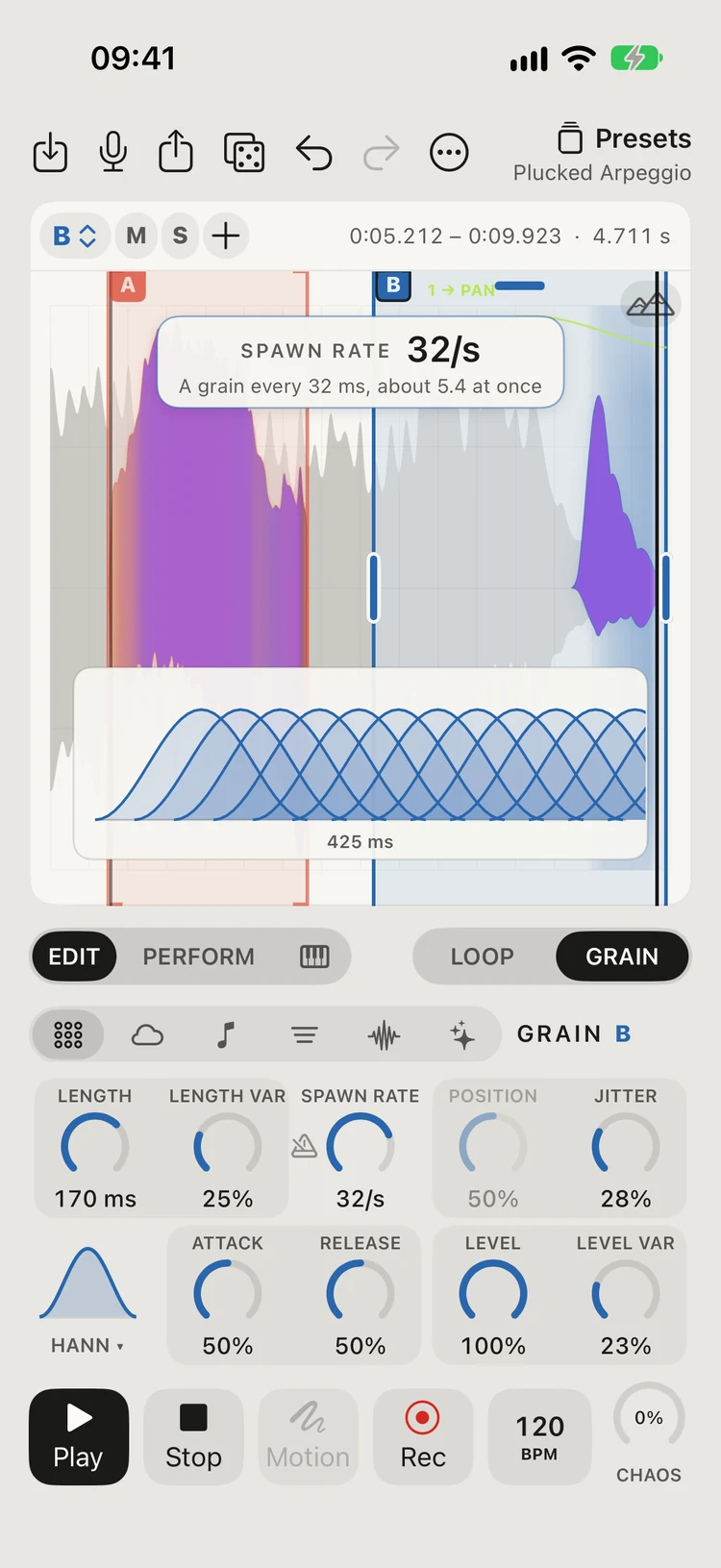
Every knob, shownTurn SPAWN RATE and a row of grains shows how often they come and how many overlap. 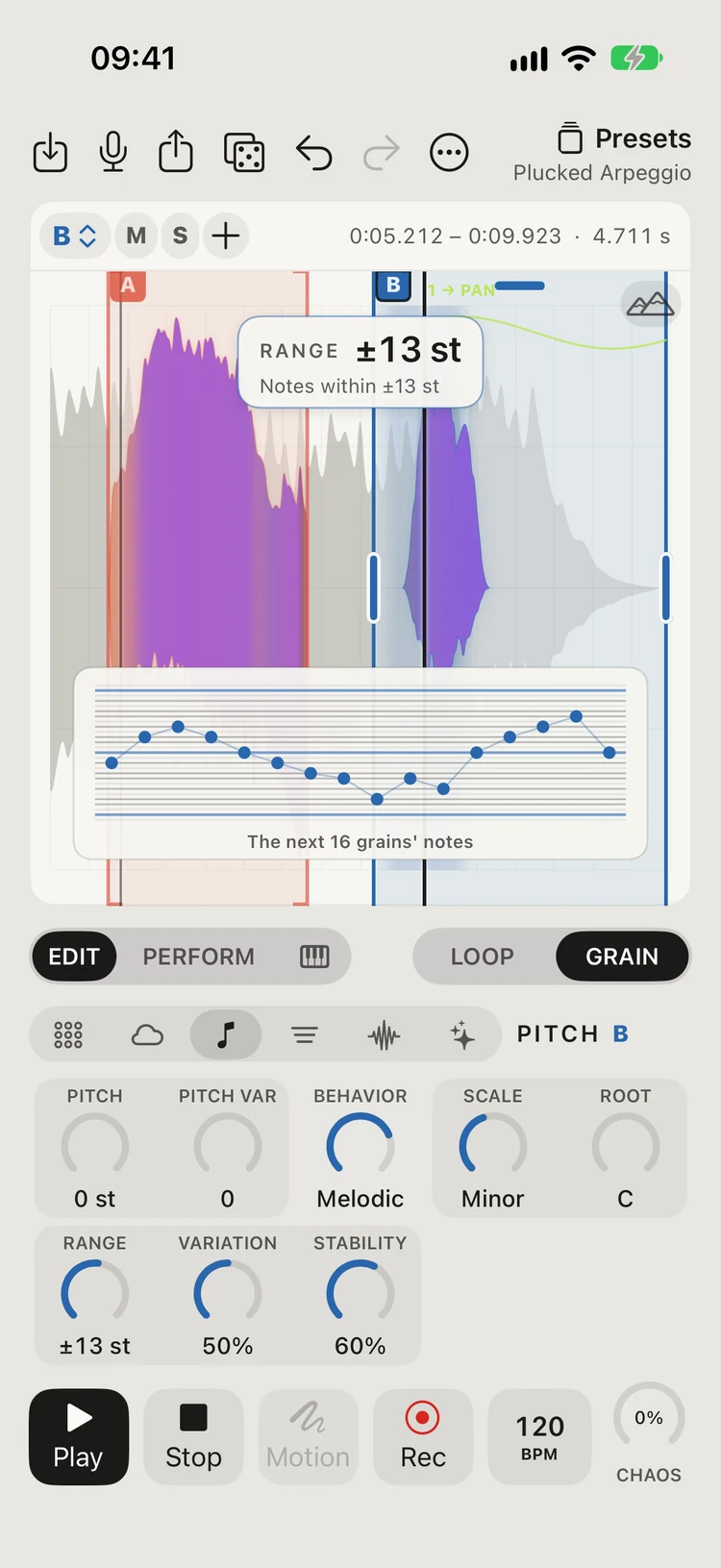
MelodiesEach grain picks its note in the key: here a melody in C minor, its next notes drawn on the waveform. 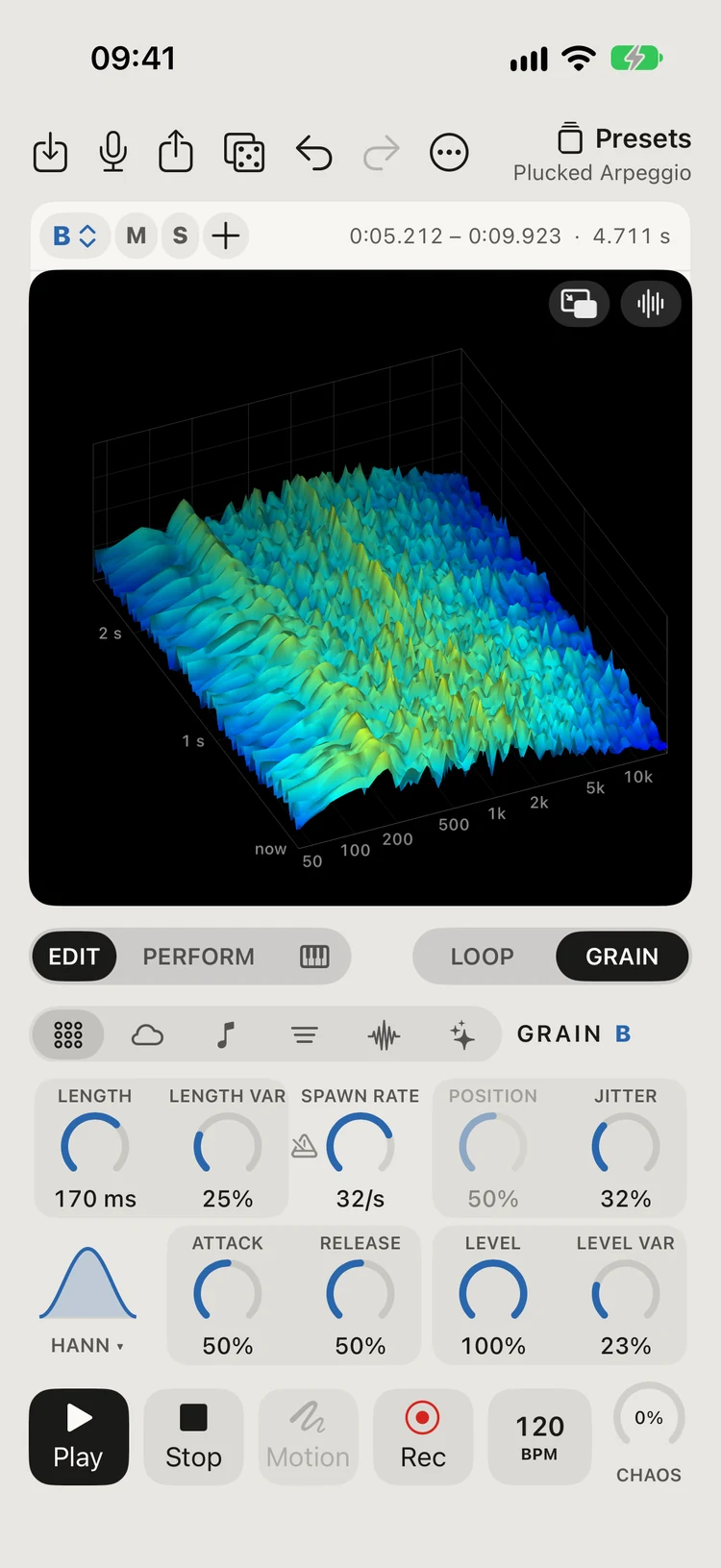
SpectrogramWhat’s playing, live, in 3D. Dock it in a corner to see the waveform too. 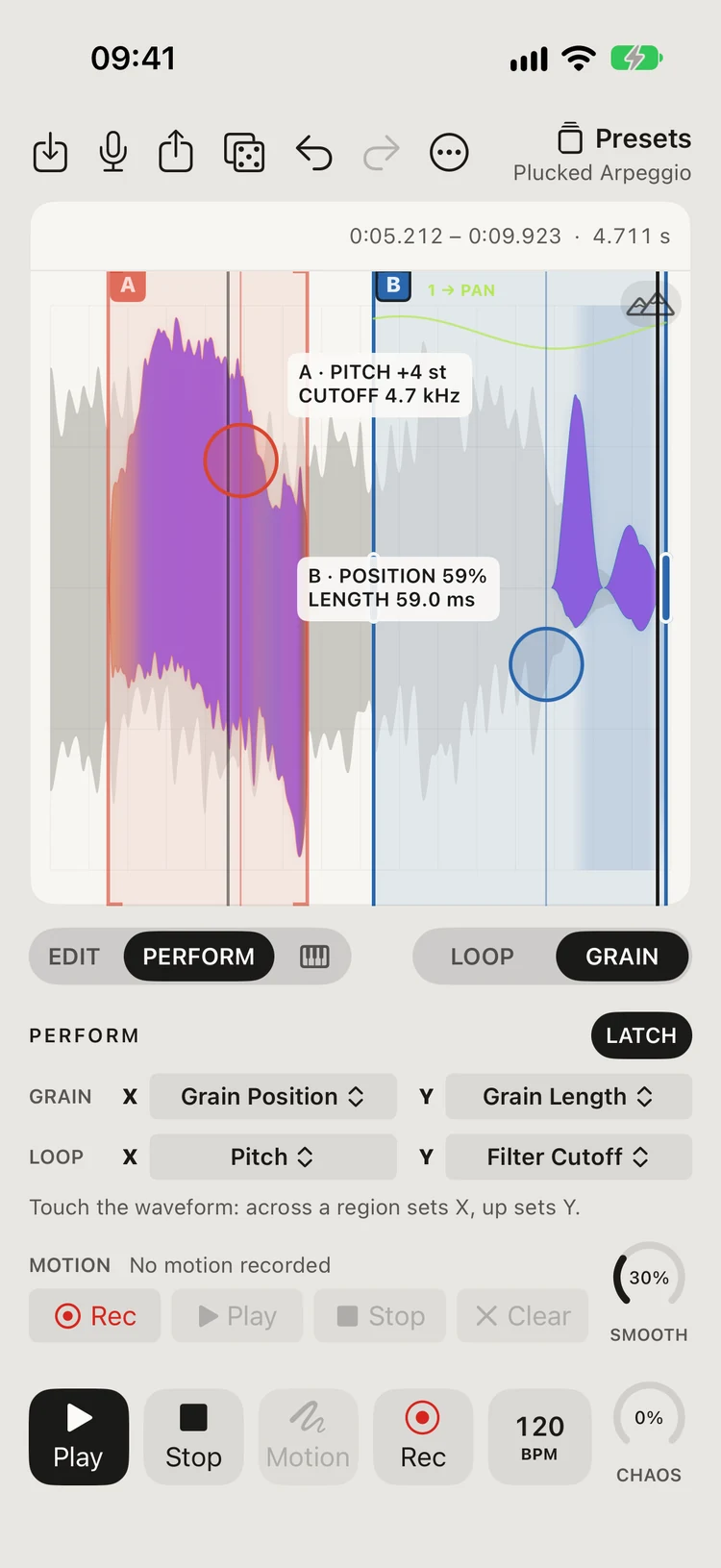
PerformYour fingers play the waveform. Choose what X and Y set.
Videos
See it, hear it
Windows VST3 1.1.13 · iOS 1.1 build 13 compatibility
Your Grainfold projects.
In your Windows DAW.
Play Grainfold as a VST3 instrument, with grains up to two seconds, tempo-synced length and rates, and the same .grainfold project format as the mobile app.
Link LENGTH and SPAWN RATE, then turn the following knob to adjust OVERLAP. Its readout shows the resulting grain length or rate.
Download Windows VST3Windows 10 or 11 · x64 · 64-bit VST3 host required. The ZIP contains the complete plug-in folder, installation guide and third-party notices.
01Install the plug-in
Close your DAW and extract the ZIP. Copy the entire Grainfold.vst3 folder, including its Contents subfolder, into C:\. Windows may request administrator permission to copy there.
Reopen your DAW and scan for VST3 plug-ins. Add Grainfold as an instrument on a MIDI track, load a sample or project, and play notes.
To update, close the DAW and replace the existing complete Grainfold.vst3 folder.
02Find Grainfold in REAPER
In 64-bit REAPER, open Options → Preferences → Plug-ins → VST and choose Re-scan. Open a track’s FX browser and search for Grainfold.
Use LOAD AUDIO to start from a recording, or LOAD PROJECT to continue a saved Grainfold project. Send MIDI notes to the track to play the selected region.
03Move projects between phone and desktop
Share a .grainfold project from the mobile app with its source audio included, copy the file to Windows, and choose LOAD PROJECT in the plug-in.
Use SAVE PROJECT with audio included to take the edited project back to the mobile app. Both use the same project format and synthesis controls.
Follow along
New sounds, tips and performances made with Grainfold.

GRAINFOLD
Record anything. Turn it into sound. On mobile and in your Windows DAW.
Free to try. The full version: $19.99, one time, for life.
More from Nightly Build Audio